
WAI Docs Wed Aug 19 13:22:37 EDT 2026
List
Quick Start
Quick Start
User Guide
User Guide
Policies - GuardRails
Policies - GuardRails
Witness Anywhere: Remote Device Security
Witness Anywhere: Remote Device Security
Witness Attack
Witness Attack
Administrator Guide
Administrator Guide
404
404
Behavioral Activity GuardRail
Behavioral Activity is the WitnessAI user behavior and intention GuardRail. Its purpose is to monitor user behavior during interactions with AI models, determine the user’s intentions, and provide control over these activities.
When this Guardrail detects specified activities, it provides the option to Allow, Warn, Block or Route the prompt to another model.
For example, technical support-related behaviors can be automatically routed to an internal model designed to assist employees, ensuring appropriate handling and alignment with internal policies.
WitnessAI Policies enable organizations to manage and control AI usage effectively. By using Behavioral Activity GuardRail, administrators can define rules that enhance compliance, productivity, and ethical AI use.
Use Case Examples
Ethical AI Usage
Warn or block users attempting to engage in unethical or non-compliant behavior.
Secure AI Usage:
Block users generating prompts that might lead to security or compliance risks.
Behavioral Activity GuardRails are integrated into policies to provide granular control over user behaviors.
Technical Support Queries
Route prompts requesting technical support to an internal model specialized for technical assistance.
Using Behavioral Activity Step-by-Step
This section covers details on how to add a Behavioral Activity GuardRail to a Policy.
Adding a Behavioral Activity GuardRail
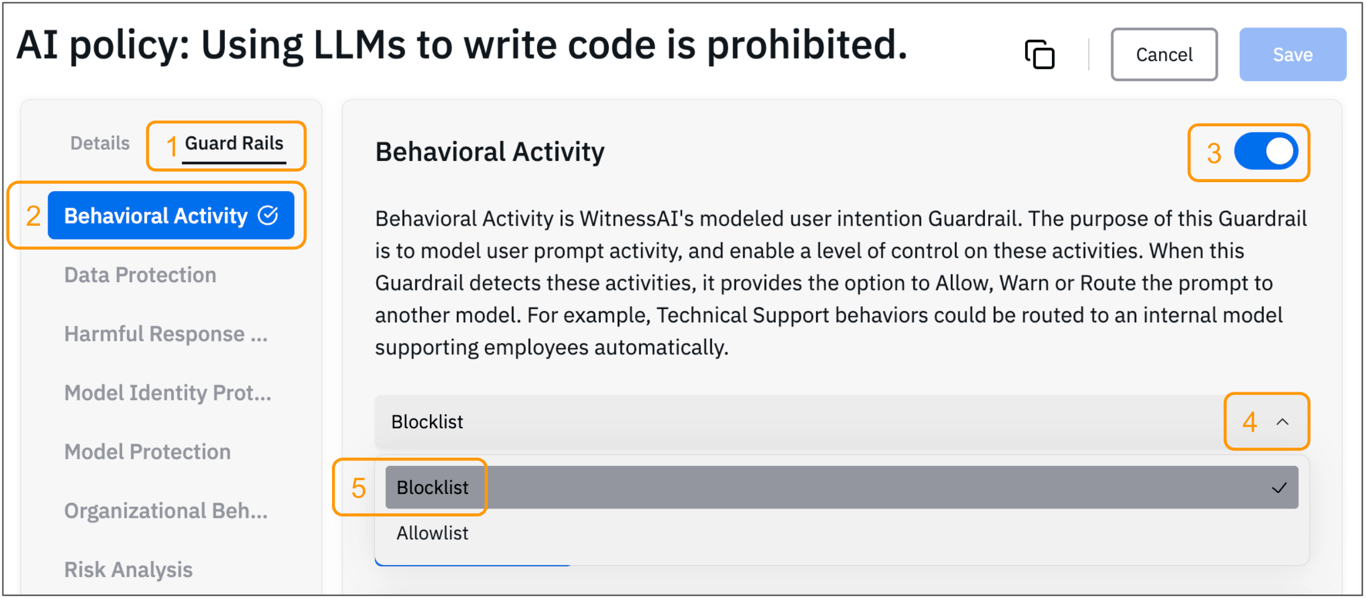
After creating a Policy
- Click the Guard Rails (1) tab in the policy editor.
- Select the Behavioral Activity (2) GuardRail from the available options.
- Click the slide button (3) to enable the GuardRail.
- Click the down-arrow (4) and choose ‘Blocklist’ or ‘Allowlist’ from the drop-down list.
‘Blocklist’ only blocks the behaviors explicitly listed, and everything else is allowed by default.
‘Allowlist’ only allows the behaviors explicitly listed, and everything else is blocked by default.
Add one or more Behaviors
One or more Behaviors can be added to each Input Behavior section, and one or more Input Behavior sections can be added to a single Policy, as shown in the image below.
- Specify the action to take when the Behavioral Activity GuardRail detects relevant behaviors. Note that choosing ‘Allowlist’ or ‘Blocklist’, will determine which options are displayed in the following section, as shown below.
- Allow: Permit the behavior without restriction.
- Warn: Display a customizable warning message to the user.
- Route: Redirect the detected behavior to a specific model for specialized handling (e.g., route technical queries to an internal support model).
- Block: Block the behavior, with an optional message to the user.
- Warn: Display a customizable warning message to the user.
- Route: Redirect the detected behavior to a specific model for specialized handling (e.g., route technical queries to an internal support model).
- Customize any associated messages or routing details as needed.
- Save the configuration.
- Test the policy in a controlled environment to ensure it behaves as expected.
Allowlist presents these options:
“Block” is not available for the Allowlist option. All Allowlist behavior is expected to be allowed. Any behavior that needs to be blocked, should have a GuardRail defined for that.
Blocklist
“Allow” is not available for a GuardRail defined as “Blocklist” by default.
Note: When multiple Behavior sections are defined within a Behavioral GuardRail, they have an implied “OR” relationship.

Best Practices
- Multiple Input Behavior sections can be defined within a Behavioral GuardRail, as in the image above, they have an implied “OR” relationship. This means that as the GuardRail evaluates the User Prompts, it will evaluate each Behavior from the top to the bottom, and the first one that matches will have it’s action applied to the Prompt. Subsequent Behaviors lower down the list will not be evaluated for that Prompt.
- Behavior Routing: Define clear rules for routing prompts to appropriate models based on detected behaviors.
- Customization: Use the customizable warning feature to provide context-specific guidance.
- Testing: Always test policies and GuardRails in a controlled environment before deploying them organization-wide.